


Windows 11 Pro for Workstations Lifetime Retail License
₱2,880.00
✔ Lifetime Product Key
✔ For 1 PC
✔ For High-Performance PCs & Servers
✔ Binds to Your Microsoft Account
✔ Fully Transferable to a New PC
✔ Instant Digital Delivery & Support
✔ Lifetime Guarantee
In stock



Receive your genuine license, official download, and setup guide by email within 30 minutes of payment, with 24/7 live chat support.
Windows 11 Pro for Workstations Lifetime Retail License
Lifetime Product Key • Transferable • 1 PC at a Time
The Ultimate Windows 11 License for Work and Play
Choose a Windows 11 Pro for Workstations product key to activate the Workstations edition on your PC. Whether you use your PC for gaming, video editing and rendering, professional work, business, or data management, you get every feature of Pro plus advanced hardware and storage capabilities for demanding workloads. Your genuine lifetime license binds to your Microsoft account and is transferable to another PC, so it can move with you when you change computers. One PC at a time.
Key Features & Benefits of a Windows 11 Pro for Workstations License
This is not just another version of Windows. It’s a specialized OS built for raw performance and resilience.
| Feature | Your Benefit |
|---|---|
| Ultimate Performance Mode | Optimize your system for demanding workloads by eliminating micro-latencies and pushing your hardware to its absolute peak. |
| Advanced Hardware Support | Unleash the full potential of your high-end PC with support for up to 4 CPUs and a massive 6TB of RAM. |
| Resilient File System (ReFS) | Protect large projects with ReFS, which detects data corruption and can repair it using a healthy copy stored in mirrored Storage Spaces. |
| Persistent Memory (NVDIMM-N) | Access and write your files at the fastest speeds possible with support for next-generation, non-volatile memory modules. |
| Faster Network File Sharing (SMB Direct) | Leverage network adapters with RDMA to get high-speed, low-latency access to files on network servers with very low CPU usage. |
Who is Windows 11 Pro for Workstations For?
This license is the perfect choice for professionals whose work cannot be compromised by slowdowns or data errors:
- Data Scientists & Researchers running complex, large-scale data simulations and analysis.
- Animators, 3D Artists, & Video Editors working with massive files and rendering-intensive projects.
- Architects & Engineers using demanding CAD, modeling, and design software.
- Software Developers compiling huge codebases and running multiple heavy virtual machines.
- PC Enthusiasts with server-grade hardware seeking the absolute pinnacle of performance and stability.
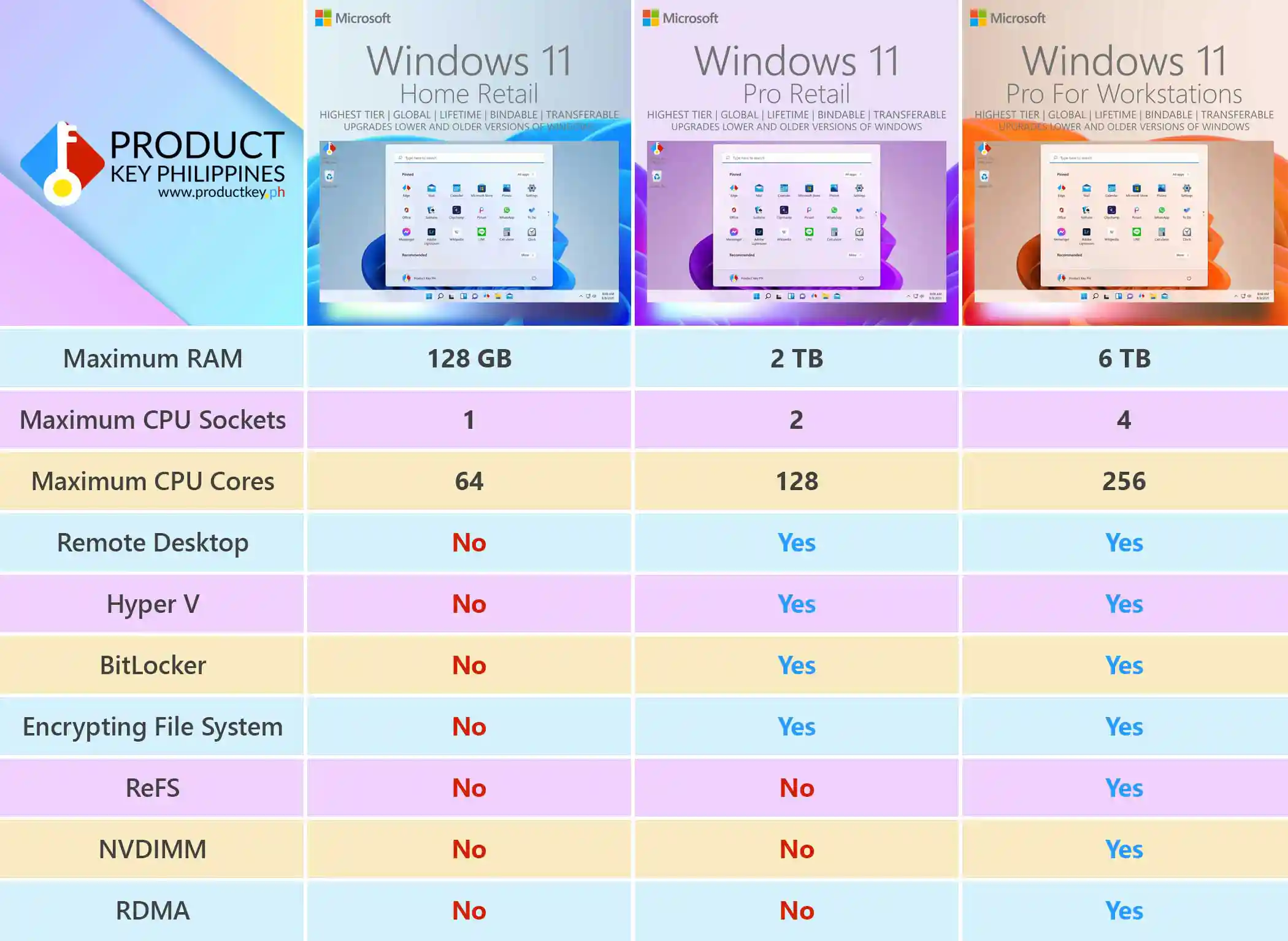
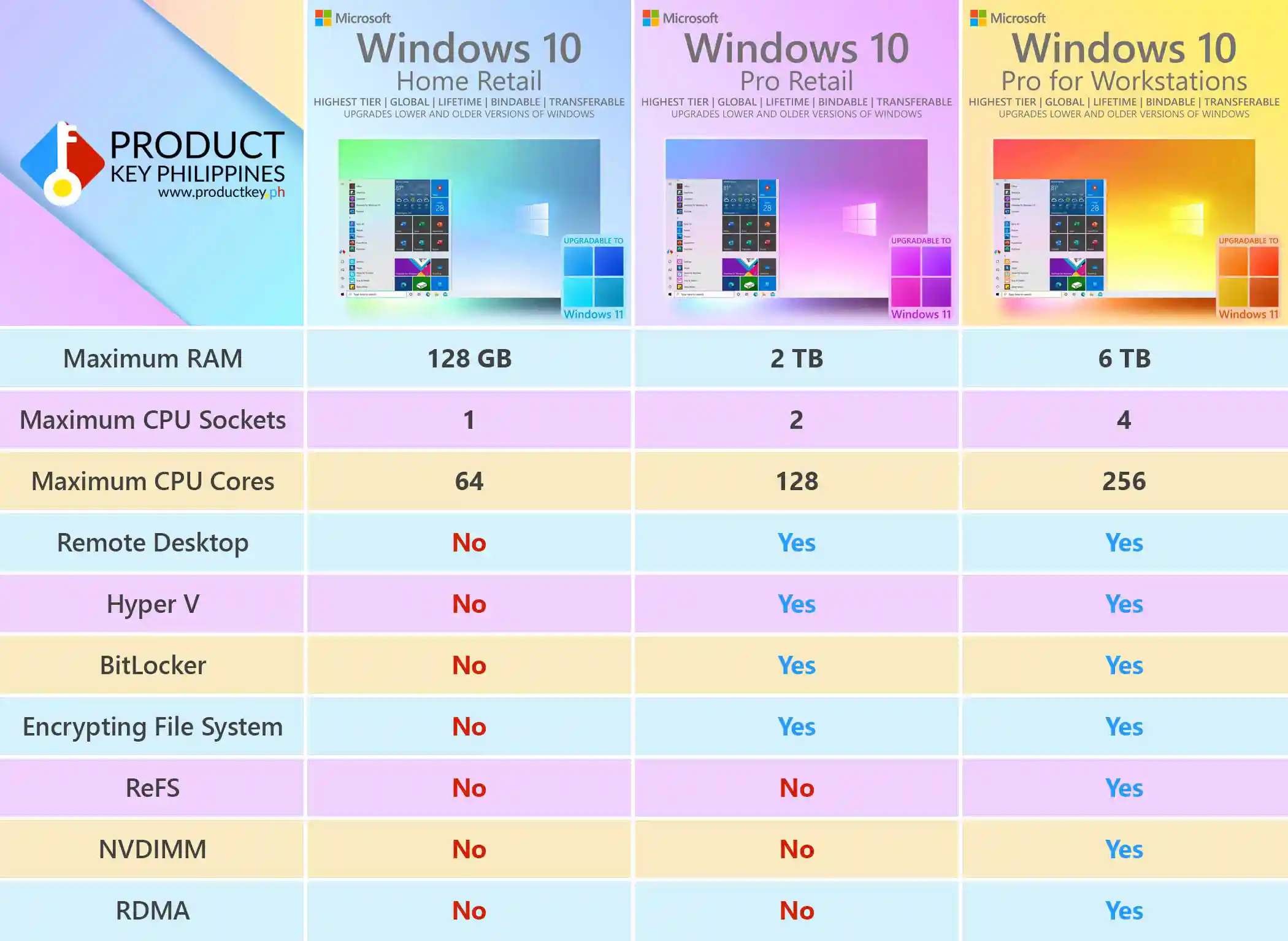
Windows 11 Pro for Workstations vs. Pro vs. Home Comparison
Wondering which version is right for you? Here’s a quick comparison of the key limitations.
| Feature | Windows 11 Home | Windows 11 Pro | Windows 11 Pro for Workstations |
|---|---|---|---|
| Maximum RAM | 128 GB | 2 TB | 6 TB |
| Maximum CPU Sockets | 1 | 2 | 4 |
| Maximum CPU Cores | 64 | 128 | 256 |
| Remote Desktop hosting | No | Yes | Yes |
| Hyper-V Virtualization | No | Yes | Yes |
| BitLocker Drive Encryption | No | Yes | Yes |
| Encrypting File System (EFS) | No | Yes | Yes |
| Resilient File System (ReFS) | No | No | Yes |
| Persistent Memory (NVDIMM) | No | No | Yes |
| Faster File Sharing (RDMA) | No | No | Yes |
Important
If you are doing a clean installation, install Windows 11 Home or Pro first without entering a product key. Once installed, enter the product key via Windows Activation Settings to activate and upgrade to Windows 11 Pro for Workstations.
Save Over 87% on Your Windows 11 Pro for Workstations License
Windows 11 Pro for Workstations retail license costs about ₱23,000. Here at Product Key Philippines, the exact same genuine lifetime license is available for just ₱2,880. You save over 87%!
Software Lifetime Guarantee
Your license is guaranteed until the software’s lifecycle ends. If it stops working before then, we’ll replace it for free!
The Highest Tier Windows License for the Most Powerful PCs
Enjoy a genuine Windows 11 Pro for Workstations lifetime retail license that binds to your personal Microsoft account, with no recurring subscription fee.
Reformat your PC, make minor hardware upgrades, replace major components, or switch to a completely new PC without buying another Windows license. One PC at a time.
Explore the benefits of account linking or get help through our 24/7 live chat support.
How to Use Your Windows 11 Pro for Workstations Product Key
- Check Your Email: Immediately after purchase, you will receive an email with your genuine product key and the official Microsoft download link.
- Windows 11 is already installed? Go to Settings > System > Activation > Change product key and enter your Pro for Workstations key to upgrade from Home or Pro, or activate an existing Workstations installation.
- Need to install Windows 11? Back up your files first. A clean installation removes files, apps, and settings from the Windows installation drive. Install Windows 11 Home or Pro first using the official download link, selecting I don’t have a product key if prompted. Once installed, follow 2A to upgrade and activate.
For detailed instructions with screenshots, see our Windows 11 installation guide.
Product Specifications
- License Type: Lifetime Retail
- Architecture: 64-bit
- Device Count: For 1 PC
- Transferability: License can be transferred to a new PC
- Binding: Binds to your personal Microsoft Account
System Requirements
- Processor: 1 GHz or faster with 2 or more cores on a compatible 64-bit processor
- RAM: 4 GB or more
- Storage: 64 GB or larger storage device
- System Firmware: UEFI, Secure Boot capable
- TPM: Trusted Platform Module (TPM) version 2.0
- Graphics Card: Compatible with DirectX 12 or later with WDDM 2.0 driver
Frequently Asked Questions (FAQ)
- What’s the main difference between Pro and Pro for Workstations? Windows 11 Pro for Workstations takes Pro further for power users who game, create, and multitask on the same PC. With advanced hardware support, high-speed storage capabilities, and accelerated file sharing, it is built to handle intensive video processing, rendering, large projects, and demanding applications. It’s the premium choice for powerful PCs that need to work as hard as you play.
- Is this a lifetime license? Yes, this is a one-time purchase for a permanent, lifetime retail license. It will never expire.
- Can I transfer this license to another computer? Absolutely. This is the highest tier Windows 11 license. It binds to your Microsoft account and is transferable to another PC. One PC at a time.
- How do I receive my product key? Your genuine product key is delivered instantly and automatically to your email address, 24/7, immediately after your payment is confirmed.
- Is this license genuine? How can I verify it? Yes, it is 100% genuine. You can verify this after activating Windows and binding the license to your Microsoft account by visiting account.microsoft.com/devices. Because this is a genuine retail license recognized by Microsoft, your device will appear on your Microsoft Devices dashboard, giving you access to powerful online device management tools such as Find my device, remote lock, and remote data wipe. This is the ultimate proof of authenticity.
- Why is this so much cheaper? Is it really genuine? Think of it like group buying discount. A single retail purchase directly from Microsoft is expensive because it’s sold one-by-one. We work within enterprise partner frameworks to acquire genuine access in bulk, and we pass those huge savings on to you. You get the exact same authentic retail product, just delivered more efficiently and affordably.
Product Key Philippines only sells software licenses of European origin legally usable on all countries and territories without region restrictions. We are protected by law to sell this product and your purchase is protected and recognized by law under Article 4(2) of EU Directive 2009/24/EC and section 177.3 of the Intellectual Property Code Of The Philippines. We are a fully registered business entity accredited by the Department of Trade and Industry (DTI), Bureau of Internal Revenue (BIR), and the Local Government of Quezon City.
112 reviews for Windows 11 Pro for Workstations Lifetime Retail License
You must be logged in to post a review.

Email Delivery
You will receive your genuine license, official download link and official installation instructions via email within 5 to 30 minutes 24/7 after sending us the proof of payment.
If a physical sales invoice was requested with your completed purchase, it will be shipped the next day. It will arrive within 2-3 days for Metro Manila addresses and 3-5 days for addresses outside Metro Manila.





petertorres002 –
After purchasing I thought it was not legit..But Once the product was received all I can say is that it was superb..
petertorres002 –
Holy Moly..It was legit…The product was awesome it really makes my work soft and fast.Must try now..
khalidbhadling –
Very responsive support, nasagot lahat ng question ko and naisend agad ang product key sa email ko about 3 minutes nareceived ko na agad sa email ko the product working well thank you.
roymalbertcalog –
Its my 3rd time purchasing here and it never disappoint me super very highly recommend will share this to my colleagues legit and worth it mabilis lang din ang delivery see you to my next order <3
zaundelatore –
Very quick and smooth transaction.received the license and installation the same day after purchasing my order and there was no hassle in installation since may complete guide sila and visual guide sobrang thanks.
carlphilippelabrador –
I got the product key quickly and had a good support too! Thank you sa mga bumubuo ng product key Godless you all product key is perfectly working mas better na ang nagagawa ko sa work ko thank you po again.
Daryll Guelas (verified owner) –
The software I purchased is legit and easy to install. Their website is user friendly with customer service chat support who can help every step of the way. Btw, I just received the USB that is included in my transaction. More power to your business! Will order again in this shop! ❤️
Jake Hernandez (verified owner) –
I’m an architect and recently upgraded my PC. A fellow architect mentioned that AutoCAD runs smoother on Windows 11 Pro better and he was definitely on point. I’m so glad I made the switch.
Rachel Tan (verified owner) –
Legit 100%.
Joshua Gonzales (verified owner) –
I highly recommend this company. Since starting WFH, I’ve been having to install more and more software and applications on my personal PC and I noticed that I was lagging to much. I read in our WFH GC that some of workmates upgraded to Windows 11 Pro specifically for workstations and have been having better faster application response from the interfaces that we use. This site was mentioned by my workmate, so I immediately visited the site, placed my order and received the product key in not time. Loading is much faster now and what I used to do in minutes, I can now do in seconds. Definitely, worth the upgrade.
Mara Tayag (verified owner) –
Cheap and legit. Anytime pwede mo makausap ang costumer support nila and maayos silang kausap. They guided me sa pag upgrade ng Windows 11 Pro ko. Thank you productkey.ph. You never fail to meet my expectations. You are the fastest and the most consistent.
Angel Rivera (verified owner) –
Legit! After I purchased 1, enter ng license. After restart upgraded na ung OS ko into workstation version. Worth every penny every time. Open din sila 24/7. Ayos na ayos ito sa mga gusto bumili online ng walang katakot takot. Lahat ng products nila legit.