


Windows 11 Pro for Workstations Lifetime Retail License
₱2,880.00
✔ Lifetime Product Key
✔ For 1 PC
✔ For High-Performance PCs & Servers
✔ Binds to Your Microsoft Account
✔ Fully Transferable to a New PC
✔ Instant Digital Delivery & Support
✔ Lifetime Guarantee
In stock



Receive your genuine license, official download, and setup guide by email within 30 minutes of payment, with 24/7 live chat support.
Windows 11 Pro for Workstations Lifetime Retail License
Lifetime Product Key • Transferable • 1 PC at a Time
The Ultimate Windows 11 License for Work and Play
Choose a Windows 11 Pro for Workstations product key to activate the Workstations edition on your PC. Whether you use your PC for gaming, video editing and rendering, professional work, business, or data management, you get every feature of Pro plus advanced hardware and storage capabilities for demanding workloads. Your genuine lifetime license binds to your Microsoft account and is transferable to another PC, so it can move with you when you change computers. One PC at a time.
Key Features & Benefits of a Windows 11 Pro for Workstations License
This is not just another version of Windows. It’s a specialized OS built for raw performance and resilience.
| Feature | Your Benefit |
|---|---|
| Ultimate Performance Mode | Optimize your system for demanding workloads by eliminating micro-latencies and pushing your hardware to its absolute peak. |
| Advanced Hardware Support | Unleash the full potential of your high-end PC with support for up to 4 CPUs and a massive 6TB of RAM. |
| Resilient File System (ReFS) | Protect large projects with ReFS, which detects data corruption and can repair it using a healthy copy stored in mirrored Storage Spaces. |
| Persistent Memory (NVDIMM-N) | Access and write your files at the fastest speeds possible with support for next-generation, non-volatile memory modules. |
| Faster Network File Sharing (SMB Direct) | Leverage network adapters with RDMA to get high-speed, low-latency access to files on network servers with very low CPU usage. |
Who is Windows 11 Pro for Workstations For?
This license is the perfect choice for professionals whose work cannot be compromised by slowdowns or data errors:
- Data Scientists & Researchers running complex, large-scale data simulations and analysis.
- Animators, 3D Artists, & Video Editors working with massive files and rendering-intensive projects.
- Architects & Engineers using demanding CAD, modeling, and design software.
- Software Developers compiling huge codebases and running multiple heavy virtual machines.
- PC Enthusiasts with server-grade hardware seeking the absolute pinnacle of performance and stability.
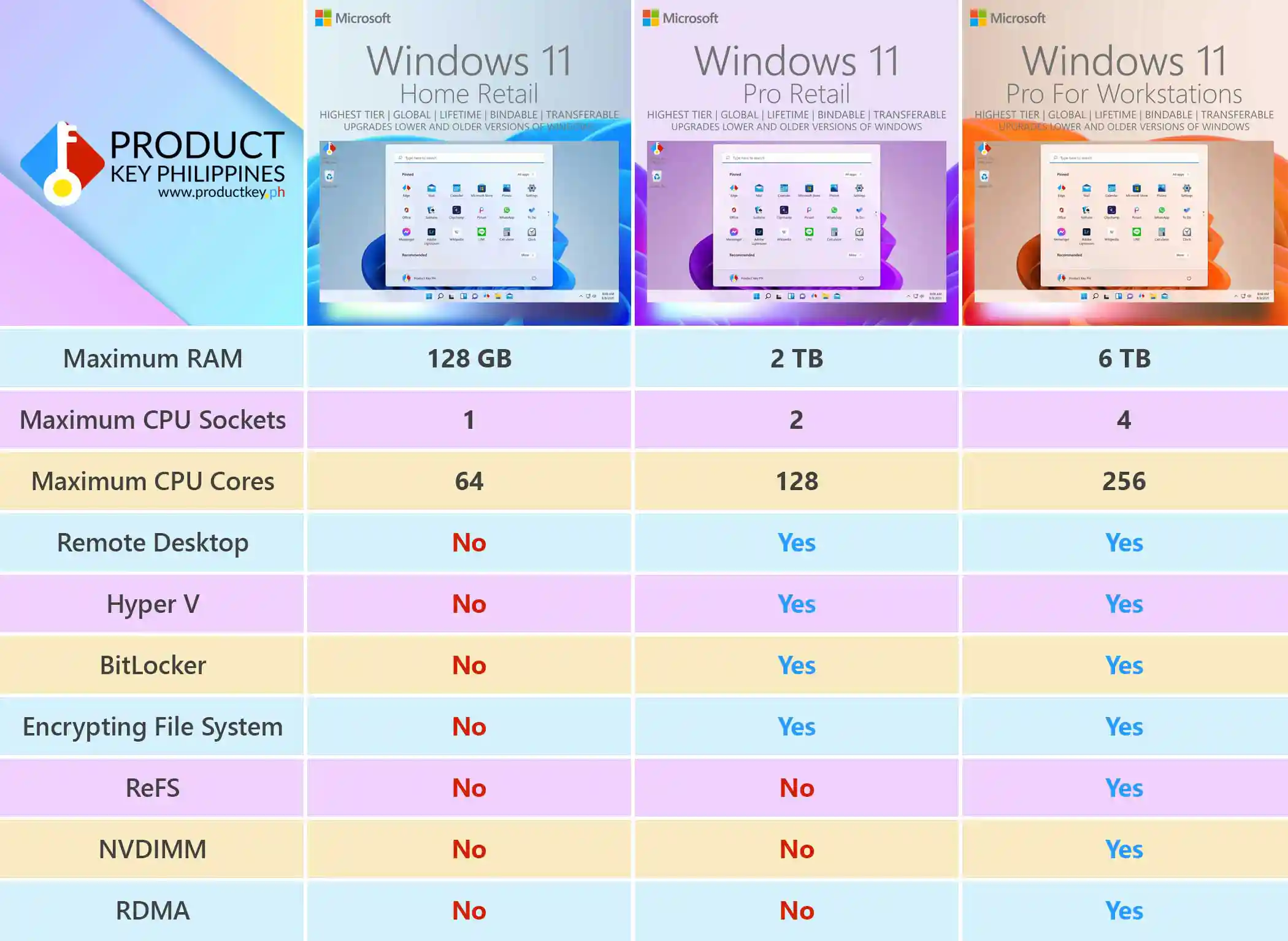
Windows 11 Pro for Workstations vs. Pro vs. Home Comparison
Wondering which version is right for you? Here’s a quick comparison of the key limitations.
| Feature | Windows 11 Home | Windows 11 Pro | Windows 11 Pro for Workstations |
|---|---|---|---|
| Maximum RAM | 128 GB | 2 TB | 6 TB |
| Maximum CPU Sockets | 1 | 2 | 4 |
| Maximum CPU Cores | 64 | 128 | 256 |
| Remote Desktop hosting | No | Yes | Yes |
| Hyper-V Virtualization | No | Yes | Yes |
| BitLocker Drive Encryption | No | Yes | Yes |
| Encrypting File System (EFS) | No | Yes | Yes |
| Resilient File System (ReFS) | No | No | Yes |
| Persistent Memory (NVDIMM) | No | No | Yes |
| Faster File Sharing (RDMA) | No | No | Yes |
Important
If you are doing a clean installation, install Windows 11 Home or Pro first without entering a product key. Once installed, enter the product key via Windows Activation Settings to activate and upgrade to Windows 11 Pro for Workstations.
Save Over 87% on Your Windows 11 Pro for Workstations License
Windows 11 Pro for Workstations retail license costs about ₱23,000. Here at Product Key Philippines, the exact same genuine lifetime license is available for just ₱2,880. You save over 87%!
Software Lifetime Guarantee
Your license is guaranteed until the software’s lifecycle ends. If it stops working before then, we’ll replace it for free!
The Highest Tier Windows License for the Most Powerful PCs
Enjoy a genuine Windows 11 Pro for Workstations lifetime retail license that binds to your personal Microsoft account, with no recurring subscription fee.
Reformat your PC, make minor hardware upgrades, replace major components, or switch to a completely new PC without buying another Windows license. One PC at a time.
Explore the benefits of account linking or get help through our 24/7 live chat support.
How to Use Your Windows 11 Pro for Workstations Product Key
- Check Your Email: Immediately after purchase, you will receive an email with your genuine product key and the official Microsoft download link.
- Windows 11 is already installed? Go to Settings > System > Activation > Change product key and enter your Pro for Workstations key to upgrade from Home or Pro, or activate an existing Workstations installation.
- Need to install Windows 11? Back up your files first. A clean installation removes files, apps, and settings from the Windows installation drive. Install Windows 11 Home or Pro first using the official download link, selecting I don’t have a product key if prompted. Once installed, follow 2A to upgrade and activate.
For detailed instructions with screenshots, see our Windows 11 installation guide.
Product Specifications
- License Type: Lifetime Retail
- Architecture: 64-bit
- Device Count: For 1 PC
- Transferability: License can be transferred to a new PC
- Binding: Binds to your personal Microsoft Account
System Requirements
- Processor: 1 GHz or faster with 2 or more cores on a compatible 64-bit processor
- RAM: 4 GB or more
- Storage: 64 GB or larger storage device
- System Firmware: UEFI, Secure Boot capable
- TPM: Trusted Platform Module (TPM) version 2.0
- Graphics Card: Compatible with DirectX 12 or later with WDDM 2.0 driver
Frequently Asked Questions (FAQ)
- What’s the main difference between Pro and Pro for Workstations? Windows 11 Pro for Workstations takes Pro further for power users who game, create, and multitask on the same PC. With advanced hardware support, high-speed storage capabilities, and accelerated file sharing, it is built to handle intensive video processing, rendering, large projects, and demanding applications. It’s the premium choice for powerful PCs that need to work as hard as you play.
- Is this a lifetime license? Yes, this is a one-time purchase for a permanent, lifetime retail license. It will never expire.
- Can I transfer this license to another computer? Absolutely. This is the highest tier Windows 11 license. It binds to your Microsoft account and is transferable to another PC. One PC at a time.
- How do I receive my product key? Your genuine product key is delivered instantly and automatically to your email address, 24/7, immediately after your payment is confirmed.
- Is this license genuine? How can I verify it? Yes, it is 100% genuine. You can verify this after activating Windows and binding the license to your Microsoft account by visiting account.microsoft.com/devices. Because this is a genuine retail license recognized by Microsoft, your device will appear on your Microsoft Devices dashboard, giving you access to powerful online device management tools such as Find my device, remote lock, and remote data wipe. This is the ultimate proof of authenticity.
- Why is this so much cheaper? Is it really genuine? Think of it like group buying discount. A single retail purchase directly from Microsoft is expensive because it’s sold one-by-one. We work within enterprise partner frameworks to acquire genuine access in bulk, and we pass those huge savings on to you. You get the exact same authentic retail product, just delivered more efficiently and affordably.
Product Key Philippines only sells software licenses of European origin legally usable on all countries and territories without region restrictions. We are protected by law to sell this product and your purchase is protected and recognized by law under Article 4(2) of EU Directive 2009/24/EC and section 177.3 of the Intellectual Property Code Of The Philippines. We are a fully registered business entity accredited by the Department of Trade and Industry (DTI), Bureau of Internal Revenue (BIR), and the Local Government of Quezon City.
112 reviews for Windows 11 Pro for Workstations Lifetime Retail License
You must be logged in to post a review.

Email Delivery
You will receive your genuine license, official download link and official installation instructions via email within 5 to 30 minutes 24/7 after sending us the proof of payment.
If a physical sales invoice was requested with your completed purchase, it will be shipped the next day. It will arrive within 2-3 days for Metro Manila addresses and 3-5 days for addresses outside Metro Manila.







Neil Fernando (verified owner) –
Sobrang dali talaga iactivate ang license and hindi nag-eexpire. Actually, pang 6th ko na na purchase ng product dito pero lagi pa din mabilis ang dating ng email. Sobrang consistent.
Emar Sebastian Buenafe (verified owner) –
Worth it talaga lahat ng software I buy here. Good quality, cheap and aftersales is amazing.
gural565 (verified owner) –
Kudos Product Key PH, The best po kayo sa pag assist 24 / 7 very very good after sales Awesome dealer product worked smoothly and no delay worth buying from this store legitimate software for a lower price will definitely buy from them again and the costumer support is super responsive un ang nagustuhan ko talaga sa kanila mabilis compared to other websites dito almost instant ang pag assist ng any concerns
Karina Ferrer (verified owner) –
This software has helped me streamline my work processes. It’s fast, efficient, and very easy to use.
Richelle Cura (verified owner) –
I had a great experience shopping on this website. Finally got my windows 11 upgraded. Very sulit ang price nila dito and ang bilis din ng transaction.
Carlo Ramos (verified owner) –
I highly recommend this windows 11 pro OS to anyone who needs to upgrade their windows OS. It’s fast, efficient, and very easy to use.
Angelica Gonzales (verified owner) –
I highly recommend this software to anyone who needs a fast and reliable solution. It’s also very easy to reach customer support team. They’re very helpful.
George Manuel (verified owner) –
Napaka-accommodating ng nagbebenta at mabilis at madali ang kausap.
Riana Sevilla (verified owner) –
Fast transaction. 5 stars for me. Positive response from the customer support!
Marlon Gino Angeles (verified owner) –
100% legit. Gusto ko serbisyo nila. Legit 24 / 7. Napakabilis ng replies and pag process ng orders ko.
Anton Reyes (verified owner) –
I’ve tried other software before, but this one is, by far, the best. It’s fast, efficient, and very user-friendly.
Jomar Rivera (verified owner) –
Productkey PH has helped me save so much time and energy. 100% legit.
Marissa Lee (verified owner) –
Hindi ko na kailangan mag-alala sa mga tasks ko dahil sa bilis ng processing. Hindi rin siya nag-eexpire at magaling pa mareach ang customer support team nila.
Chino Sta. Maria (verified owner) –
This software is very consistent in terms of performance. Hindi ko inakala na may software na sobrang gaan gamitin, pero ito na yun! Ang dali ng navigation at madaling maintindihan ang mga features.
jho-5080 (verified owner) –
The product code I was given worked it’s a genuine pdf software and easy to install speedy delivery of products legit na legit and Genuine naka 8 na akong bili ng OS legit at genuine lahat mabilis pa 10 stars 🙂
Liza Marie Garcia (verified owner) –
This OS license has exceeded my expectations. It’s fast, efficient, and very easy to use. Hindi na kailangan mag-alala sa technical issues dahil mabilis ma-resolve sa software na ito.
Ranjeet Singh (verified owner) –
This software is a game-changer. It’s made my work so much easier and more efficient.
Janice Lacsa (verified owner) –
Sobrang galing talaga dito. Easy to process and activate. Naka bind na sa MS account ko. The product is legit.
Neil Lawingco (verified owner) –
This software has helped me save so much time and energy. I can now focus on more important tasks instead of spending time on manual processes.
Erika Mae MIjares (verified owner) –
Legit and genuine licenses. Wala akong masabi. Kayo talaga ang best software shop dito sa pinas na nakakita ko. Swerte ko at nakita ko ads nyo. Less hassle na for me na pumunta sa mga physical stores.